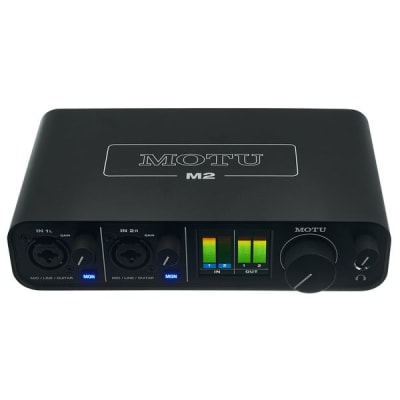
The audio interface is the centre of any modern recording studio. It is the device that allows microphones, instruments and monitors to work together with the computer and recording software (DAW) in an integrated way. Without it, digital recording is impossible: it is the point where analogue sound becomes data and where data becomes sound again. Understanding what it does, how it does it and which parameters matter when choosing one is fundamental for any producer or recording engineer.
What an audio interface does
An audio interface performs three simultaneous and inseparable functions:
- Analogue-to-digital conversion (AD): Takes the analogue electrical signal from the microphone or instrument and converts it into binary data that the computer can process and store. This conversion determines the fidelity with which the sound is captured in the recording.
- Digital-to-analogue conversion (DA): Takes the digital data from the DAW and converts it into an analogue electrical signal that can feed the studio monitors or headphones. This conversion determines the fidelity with which the engineer hears the mix.
- Input/output management (I/O): Organises all the physical connections in the system: microphone and instrument inputs, outputs to monitors and headphones, digital connections for expansion and MIDI ports.
These three main functions are complemented by preamplification: all microphones — particularly dynamic and condenser types — generate very low-level signals in the millivolt range that must be amplified to line level before they can be converted. The preamplifiers built into the interface perform that amplification.
AD/DA converters: the heart of the interface
Converter quality is the most critical technical parameter of an audio interface, though also the hardest to evaluate from specifications alone. A good converter adds no colouration of its own: it captures and reproduces whatever it is given with the greatest possible fidelity.
The parameters that determine converter quality are:
- Bit depth: Determines the dynamic range of the recording. The current standard is 24 bits, which offers a theoretical dynamic range of 144 dB, far superior to the 96 dB of the 16-bit CD standard. Recording at 24 bits provides more headroom in recording levels and more room for subsequent processing.
- Sample rate: Determines the frequency range that can be captured. The most common sample rates are 44.1 kHz (CD and music streaming standard), 48 kHz (audio for video standard) and higher multiples (88.2, 96 and 192 kHz) used in high-resolution production. Higher sample rates increase processing load and file sizes.
- Dynamic range: The difference between the converter's noise floor and the maximum level before distortion. Expressed in dB-A. High-end converters exceed 115–120 dB-A; entry-level converters typically fall between 100 and 108 dB-A.
In practice, the difference between converters is more noticeable in DA conversion (what you hear through the monitors) than in AD conversion. A good DA converter provides a more accurate and less fatiguing sonic image, which directly improves the quality of mixing decisions.
Integrated preamplifiers
All microphones generate very low-level signals — in the millivolt range — that must be amplified to line level before they can be processed. The integrated preamplifiers in the interface perform that amplification via the gain knob or potentiometer on each channel.
Preamplifier quality is one of the factors that most distinguishes interfaces across price ranges. Entry-level preamps introduce more background noise (audible as a hiss in recordings) and more distortion at high gain settings. Mid- and high-range preamps offer lower noise and greater transparency, which is particularly relevant when working with low-sensitivity dynamic microphones or in recordings that require high gain levels.
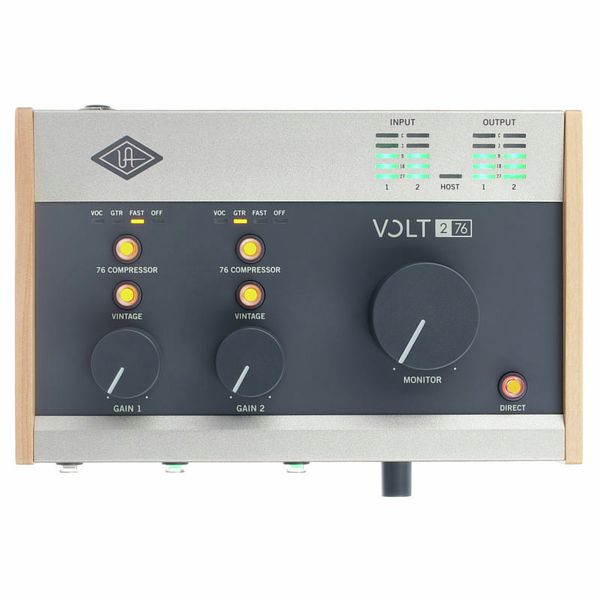
Some high-end interfaces (such as those from Audient, Universal Audio or Neve) base part of their value proposition on the quality or specific sonic character of their preamplifiers, inherited from reference analogue console designs.
Phantom power (+48V)
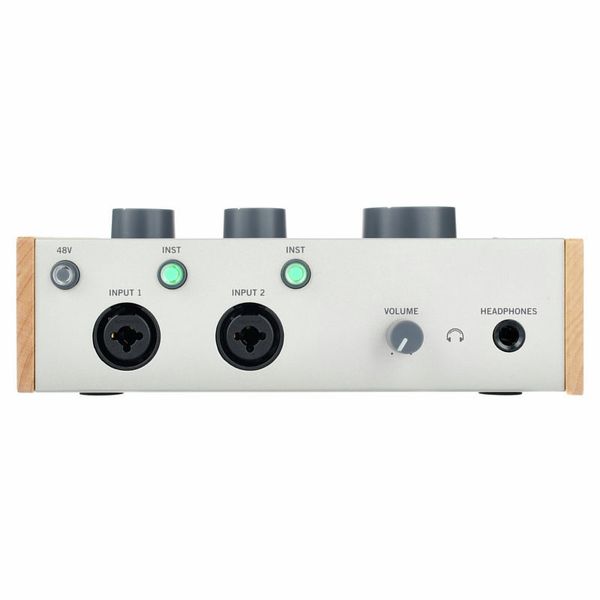
Condenser microphones need a +48V electrical supply to charge the electrostatic capsule and operate. That supply — called phantom power — is provided by the interface through the XLR cable itself, with no need for additional external power. Virtually all modern interfaces include phantom power switchable per channel or per group of channels.
Instrument inputs (Hi-Z)
Guitars and basses generate high-impedance signals that cannot be connected directly to a standard microphone input without tonal quality loss. Instrument inputs (labelled "Inst", "Hi-Z" or "DI") on the interface incorporate the necessary circuitry to receive that high-impedance signal optimally, making a DI box unnecessary in simple setups.
Latency: the unavoidable delay
Latency is the delay between the moment sound enters the interface and the moment it is heard through the monitors after passing through the DAW. It is inherent in digital processing: the computer needs a minimum amount of time to convert, process and return the audio.
Latency is controlled via the buffer size: a block of audio samples that the interface "accumulates" before sending them to the computer. A small buffer reduces the delay but demands more from the processor; a large buffer reduces the processor load but increases the delay.
The practical rule is:
- During recording: Small buffer (64–256 samples) so the musician hears their voice or instrument without perceptible delay. A delay greater than around 10–15 ms is distracting for the performer.
- During mixing: Larger buffer (512–1024 samples) to reduce the processor load and allow more plugins to run simultaneously without audio crackling or dropout.
Direct monitoring is the solution most interfaces offer to eliminate latency entirely during recording: it routes the input signal directly to the interface's headphone or monitor output without passing through the computer. The musician hears their voice or instrument in real time while the recording continues in the DAW. It is an essential function in any interface intended for recording.
Connection types to the computer
The way the interface communicates with the computer determines the available bandwidth, latency and compatibility with different platforms:
- USB (2.0 and 3.0): The most widespread and compatible standard. USB 2.0 interfaces have sufficient bandwidth for most recording applications (up to 32 simultaneous channels at 96 kHz on the most capable models). USB 3.0 does not significantly improve latency over USB 2.0, though it does allow more channels on large-format interfaces. The most accessible and universal option.
- Thunderbolt: Offers lower latencies and greater stability with many simultaneous channels because it accesses the computer's internal bus more directly. The reference option in large studios and high channel-count configurations. Requires the computer to have a Thunderbolt port.
- PCIe (internal card): Installed directly on the computer's motherboard, offering the lowest possible latency and the greatest bandwidth. Was the professional studio standard before Thunderbolt became widespread. Requires a tower computer with an available slot.
- Ethernet / Dante: Some large-format interfaces (such as the Audient ORIA or Dante-compatible models) connect to the computer via Ethernet, allowing hundreds of channels to be managed in professional audio network configurations.
Inputs and outputs: how many and what type
The number and type of inputs and outputs (I/O) on an interface determine the scale of production it can handle. The main parameters are:
- Analogue inputs with preamplifier (XLR/combo): The inputs for microphones and instruments. The number of integrated preamplifiers limits how many microphones can be recorded simultaneously without external expansion.
- Analogue outputs: Include the main outputs to monitors and, on larger interfaces, additional outputs for alternative monitoring systems or independent headphone mixes.
- Digital expansion (ADAT, S/PDIF, AES/EBU): Allow additional channels to be added by connecting external preamplifiers with digital outputs. ADAT (Lightpipe) is the most common: it transmits up to 8 additional channels over a single optical cable. The standard expansion path for increasing input count without buying a larger interface.
- MIDI: Many interfaces include MIDI inputs and outputs to connect keyboards, controllers and other devices without a separate MIDI interface.
- Word clock: Present on larger studio interfaces, allows multiple digital devices to be synchronised in complex installations using a common clock reference.
Quick guide: which interface for each use
- Podcasting, solo voice, singer-songwriter: 1–2 inputs with preamplifier. USB. Entry level.
- Home studio with guitars, vocals and keyboards: 2–4 inputs. USB. Mid-range.
- Semi-professional studio or drum recording: 8+ analogue inputs + ADAT expansion. USB or Thunderbolt.
- Professional studio with many simultaneous channels: Thunderbolt or PCIe. High-end converters. Digital expansion.
- Audio network configurations: Dante or AES67-compatible interface.
If you want to compare specific options, our audio interface comparator lets you filter by number of inputs, connection type and price to find the model that best suits your studio.